

MU Plugins
MU plugins, also known as Must Use Plugin are the plugins which are always activated inside a WordPress site, they are not shown inside the normal plugin list in a WordPress site, instead they are shown inside the section Must-Use Plugin on the plugin page.
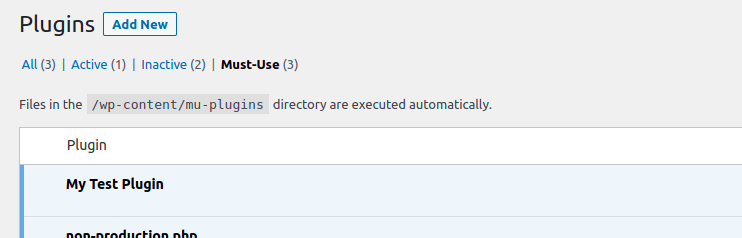
Mu-plugins are structurally same as the normal plugins, just a single difference that the Mu-Plugins cannot be added inside nested folders.
Another workaround to it could be that we can add the files inside the folders and initiate those files from the main file. WordPress would not automatically by default use the files inside the directory.
Cron API
The WordPress has its own cron API which can be used to add tasks to be executed at certain times.
Though there is one difference that this doesn’t work as a normal cron api, the actions are only triggered when a request is made to the page, so if your site does not get any traffic the cron actions would not be triggered until the page gets a hit.
WordPress provide us a way to change this behaviour by using the WordPress cron file in some other cron script and triggering it via that.
First we would need to define a constant into the wp-config file which would ensure the cron is not getting hit by normal requests.
define('DISABLE_WP_CRON', true);After this we can trigger our cron file on the URL : http://YOUR_SITE_URL/wp-cron.php
We can add this into a cron request on the ubuntu or linux server via the command
0 0 * * * wget http://YOUR_SITE_URL/wp-cron.phpScheduling a task via Cron
add_action( 'test_cron_hook', 'test_cron_function' );

function test_cron_function() {
	echo 'The cron is executed';
}

add_action( 'test_cron_hook', 'test_cron_function' );

function test_cron_function() {
	echo 'The cron is executed';
}

wp_schedule_event( time(), 'hourly', 'test_cron_hook' );
This would trigger the hook test_cron_hook every hour ( but it depends on the traffic of the site )
The WordPress cron works on the principle of hooks, it triggers the hooks to execute the cron so we should be defining our tasks and hooking them into the hooks.
WordPress Cron by default provide us a set of intervals which can be used, they are as follows
wp_get_schedules() -> This function would return these elements

$schedules = array(
	'hourly'     => array(
		'interval' => HOUR_IN_SECONDS,
		'display'  => __( 'Once Hourly' ),
	),
	'twicedaily' => array(
		'interval' => 12 * HOUR_IN_SECONDS,
		'display'  => __( 'Twice Daily' ),
	),
	'daily'      => array(
		'interval' => DAY_IN_SECONDS,
		'display'  => __( 'Once Daily' ),
	),
	'weekly'     => array(
		'interval' => WEEK_IN_SECONDS,
		'display'  => __( 'Once Weekly' ),
	),
);
Apart from these default intervals we can also add the custom intervals into the array by using the filter cron_schedules to modify the output of the function wp_get_schedules()
To remove a cron action
We can easily remove a scheduled cron event by using the function wp_unschedule_event()
We need to send the timestamp at which this function would be executed and the hook name for it
We can fetch the timestamp via the function wp_next_scheduled( $hook_name ) this would give us the timestamp for the next schedule of that particular function
wp_unschedule_event( wp_next_schedule( $hook_name ),$hook_name )We can use this function to remove the cron for the $hook_name
Drop-ins
WordPress by default provides us option to override many default functionalities, now this also includes the classes WordPress provide to change the whole functionality of many things, for example we can update the object-cache to use persistent methods of caching.
By default WordPress provides these Drops-ins
- advanced-cache.php
- db.php
- db-error.php
- install.php
- maintenance.php
- object-cache.php
- php-error.php
- fatal-error-handler.php
How to use the drop-ins?
We have to do nothing just add the same name file inside wp-content directory and the wordpress would use our provided file inside of the default class set for that
Pluggable
WordPress also has file named as pluggable.php which includes some default functions of the wordpress for example wp_mail() now if we want to override the default email functionality of the WordPress we can take advantage of the feature WordPress provides.
All the functions inside the pluggable.php are defined after checking if they are already defined or not, and the file pluggable.php is included after all the plugins are included.
So if we globally define the wp_mail() inside our plugin it would directly override the default wp_mail() functionality.
Trainsients
One thing to add for the transients, the deleted transients are deleted automatically, they have a cron defined for them, with the function delete_expired_transients the expired transients are deleted daily.