WP REST API
Pagination
Our WordPress site can hold many information, that’s why pagination becomes a requirement, when browsing our site -> the content is already paginated. The REST API also supports pagination and follows the default WordPress pagination parameters -> 10 posts per page
We can set the number of results we want per page by sending the ?per_page query parameter with our request
For example
/wp/v2/posts?per_page=5This would return only 5 posts per page.
Per page is capped at the maximum value of 100
Number of total pages?
As with the per_page parameter, the number of pages would also change, to determine the number of total pages for a particular request we can check the headers we receive with every request.
We get two headers with our response
X-WP-Total: -> This holds the total number of records for our current queryX-WP-TotalPages: -> This holds the total number of pages there would be acc to the number of records and the records per page.
Getting other pages?
If we request the data and have received the first page, to get the second page we can use the query parameter ?page to achieve this.
For example
/wp/v2/posts?page=2This would give us the posts from the second page. If we exceed the number of pages this would give us a 400 error.
Ordering of response
The REST API also support the ordering of the results [ sorting of the result ] on the basis of various parameters, we can use the ?order and ?order_by query parameters to achieve the following
For example
http://theme-assignment.local/wp-json/wp/v2/posts?per_page=10&order=asc&orderby=dateThis would order all the results in ascending order on the basis of date.
Accepted values for order_by are
- author
- date
- id
- include
- modified
- parent
- relevance
- slug
- include_slugs
- title
By default if we do not pass any order_by and use order if the result is a dated result [ it contains elements which contains date ] -> then it would default order them by the date.
_links
The REST API response also provides _links where it holds the href REST links to the related contents.
For example for posts result we can get
"_links": {
	"self": [
	{
		"href": "http://theme-assignment.local/wp-json/wp/v2/posts/33"
	}
	],
	"collection": [
	{
		"href": "http://theme-assignment.local/wp-json/wp/v2/posts"
	}
	],
	"about": [
	{
		"href": "http://theme-assignment.local/wp-json/wp/v2/types/post"
	}
	],
	"author": [
	{
		"embeddable": true,
		"href": "http://theme-assignment.local/wp-json/wp/v2/users/1"
	}
	],
	"replies": [
	{
		"embeddable": true,
		"href": "http://theme-assignment.local/wp-json/wp/v2/comments?post=33"
	}
	],
	"version-history": [
	{
		"count": 0,
		"href": "http://theme-assignment.local/wp-json/wp/v2/posts/33/revisions"
	}
	],
	"wp:attachment": [
	{
		"href": "http://theme-assignment.local/wp-json/wp/v2/media?parent=33"
	}
	],
	"wp:term": [
	{
		"taxonomy": "category",
		"embeddable": true,
		"href": "http://theme-assignment.local/wp-json/wp/v2/categories?post=33"
	},
	{
		"taxonomy": "post_tag",
		"embeddable": true,
		"href": "http://theme-assignment.local/wp-json/wp/v2/tags?post=33"
	}
	],
}
Here we are getting the direct REST links to different things -> author -> if we browse the author rest link we would get the information about the author of this post.
embedding
We can reduce the number of requests by including some embeddable information in the same response, we can use the help of the _embed parameter for this and can provide the comma separated embed things as well.
The REST API adds a link header to the frontend site automatically which holds the href link to the rest API

Authentication
Usually throughout our WordPress site we are using cookie based authentication, but if we use the same for the REST API -> any one can do a xss attack and make you to submit the requests you don’t even want to submit.
For this reason, the REST API uses nonce based verification, the REST API with authenticated routes accepts nonce value generated for the action wp_rest.
It accepts the nonce via the _wpnonce get or post data, or via the X-WP-Nonce header.
We can create the nonce and send it our ourselves via the wp_localize_script function
Backbone JavaScript Client
The default WordPress REST API also includes a JavaScript client to interact with it, it already includes several models and collections.
We can easily include it into our code by enqueuing it in our code
wp_enqueue_script( 'wp-api' );— will read more about it and test it in next post —
Extending the REST API
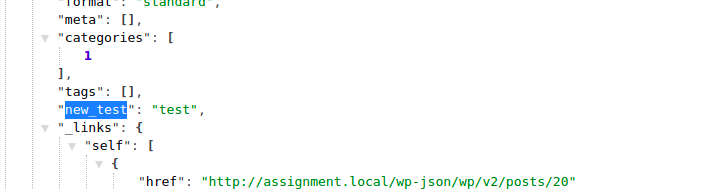
By default, the REST API only includes a set of responses/fields related to the content, if we want to add additional data with our response we can do it with the function register_rest_field and register_meta
register_rest_field
add_action( 'rest_api_init', function() {
	register_rest_field(
		'post',
		'new_test',
		array(
			'get_callback' => function( $post ) {
				return 'test';
			},
		),
	);

} );
This would register a new field new_test for post post-types