

WP CLI
Default Commands
We can use command wp help to display the list of all the available commands in our wp-cli and a short description about them.
wp helpThe wp help command can also be used to check the help / description of specific commands by adding the command after it
For e.g.
wp help user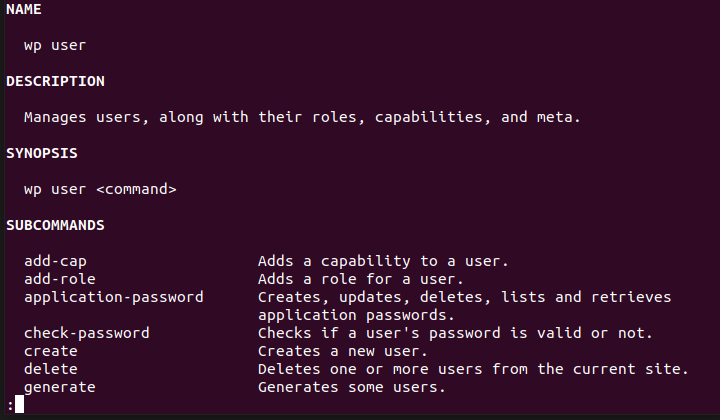
Some commands:
- wp user -> Manage the users in our WordPress site
- wp plugin -> Manage the plugins and the settings related to the plugins in our site
- wp theme -> Manage the setting related to the theme in our WordPress site
- wp core -> Manage the core files of the WordPress, allows to upgrade/downgrade the WordPress version on the site and
- wp cron -> Used to manage the cron actions on the WordPress site
- wp db -> Manage actions related to the database
- wp config -> Allows to access and manage the wp-config.php file
- wp export -> Used to export the WordPress data in the wxr format
- wp import -> Import data to WordPress site via an export file
- wp maintenance-mode -> Allows to enable/disable/check the maintenance mode for a WordPress site
- wp menu -> Allows to manage the active theme navigation menus
- wp post -> Manage the post in our WordPress site
- wp scaffold -> Command used to generate default post-type, taxonomies, etc files.
How to create a user via CLI?
A: We can use the wp user command
wp user create <name> <email>
If the user is already registered

WP SHELL
WP shell allows us to execute php code using an interactive shell, all the commands/code we add inside this shell is executed inside a WP shell.
This can be useful to debug some code we want to run inside a WP shell.
How to start a shell?
We can use the following command to invoke a shell
wp shell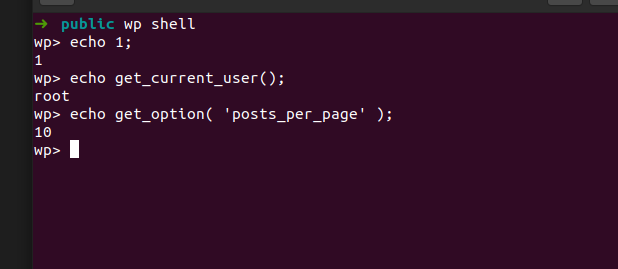
What is the prompt flag in wp cli?
We can add the --prompt flag in any wp cli command, this would allow us to interactively send the parameters one by one.
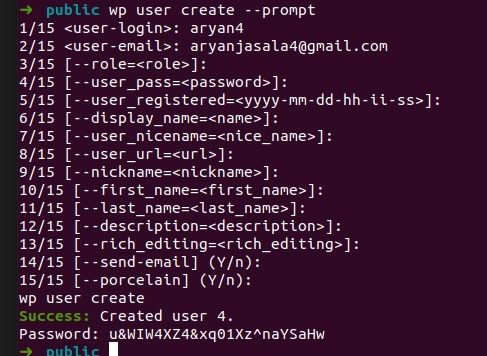
How to know which argument is optional?
Every argument inside the square brackets in the WP cli is an optional argument.
Running the WP CLI commands programmatically
The WP CLI includes a function which can be used to invoke a wp cli command from inside the code
if ( class_exists( 'WP_CLI' ) && \WP_CLI ) {
	\WP_CLI::add_command(
		'test',
		'test_command'
	);
	\WP_CLI::add_command(
		'test2',
		'test_command2'
	);
}

function test_command() {
	\WP_CLI::success( 'Test command ran' );
}

function test_command2() {
	\WP_CLI::runcommand( 'test' );
}
The runcommand function can be used, here we don’t have to pass wp instead we just have to pass the command
Adding a progressbar in WP CLI
We can use the functions provided in the Utils class, \WP_CLI\Utils\make_progress_bar( ‘heading’, $number_of_objects );
Here it would generate the progress bar for the number of objects and we can use the tick() method to increase the progress bar, at the end of our execution we can use the finish() method
$progress = \WP_CLI\Utils\make_progress_bar( 'Exporting: ', count( $items ) );

foreach ( $items as $item ) {
        sleep( 1 );
	$progress->tick(); // Increase the progress in the progress bar.
}

$progress->finish();