

Pagination
WordPress by default provides us with the pagination functions and handles the pagination automatically internally.
In our theme template files we can use the function like, next_posts_link and previous_posts_link to get the links of next and previous posts.
In both the functions we can pass text as the first parameter, that would be the label for the link.
Internally, they use get_next_posts_link() and get_previous_posts_link() function to fetch and echo the link.
These functions further internally use the function next_posts() & previous_posts().
And those functions internally use the functions get_next_posts_page_link() and get_previous_posts_page_link()
They get the current page value from the global $paged variable.
Comments
We can load the comments template in our theme template by using the function comments_template(), this would by default look for the comments.php file, we can also modify and provide a custom file by passing the first parameter as the file name.
In our template file we can use the have_comments() & the_comment() to loop through the comments and access the comment data. [ just like we do with have_posts() ]
We can also use the Comment Query to fetch the list of comments.
$comments = new WP_Comment_Query();
$comments = $comments->query( array() );

// Comment Loop
if ( $comments ) {
	foreach ( $comments as $comment ) {
		echo '<p>' . $comment->comment_content . '</p>';
	}
} else {
	echo 'No comments found.';
}
We can add arguments inside the query() the supported list of arguments are
'author_email'              => '',
'author_url'                => '',
'author__in'                => '',
'author__not_in'            => '',
'include_unapproved'        => '',
'fields'                    => '',
'ID'                        => '',
'comment__in'               => '',
'comment__not_in'           => '',
'karma'                     => '',
'number'                    => '',
'offset'                    => '',
'no_found_rows'             => true,
'orderby'                   => '',
'order'                     => 'DESC',
'paged'                     => 1,
'parent'                    => '',
'parent__in'                => '',
'parent__not_in'            => '',
'post_author__in'           => '',
'post_author__not_in'       => '',
'post_ID'                   => '',
'post_id'                   => 0,
'post__in'                  => '',
'post__not_in'              => '',
'post_author'               => '',
'post_name'                 => '',
'post_parent'               => '',
'post_status'               => '',
'post_type'                 => '',
'status'                    => 'all',
'type'                      => '',
'type__in'                  => '',
'type__not_in'              => '',
'user_id'                   => '',
'search'                    => '',
'count'                     => false,
'meta_key'                  => '',
'meta_value'                => '',
'meta_query'                => '',
'date_query'                => null, // See WP_Date_Query.
'hierarchical'              => false,
'cache_domain'              => 'core',
'update_comment_meta_cache' => true,
'update_comment_post_cache' => false,
We can use functions like comments_open() and get_comments_number() to check the status of comments and load the comment template conditionally.
We can use the functions previous_comments_link() and next_comments_link() to add pagination for comments.
The function comment_form() can be used to print the new comment form in our comment template.
Getting the comment data, the following functions can be used
- get_comment_link()
- get_comment_author()
- get_comment_date()
- get_comment_time()
- get_comment_text()
Customizer
The customizer API is used in WordPress to customize the way and feel of our theme, it also supports the live preview of the changes we are making. The customizer is accessible under Appearance -> Customize
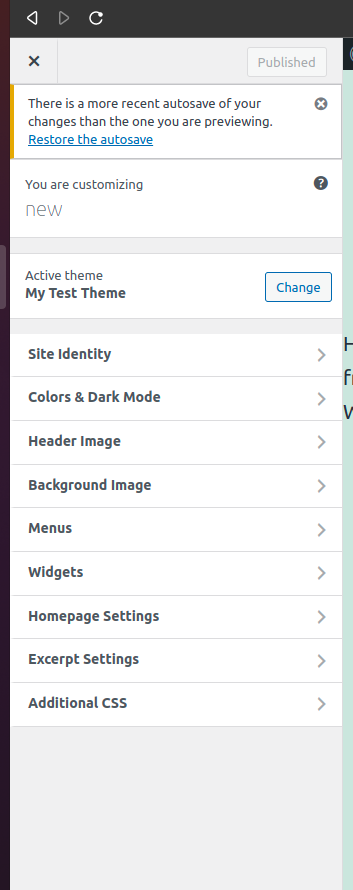

The customizer conists of Panels, Sections, Controls and Settings. They can be modified via the object.
Customizer works on the principle of objects, to make changes to the customizer we can use the customizer object and access the methods and options in it.
To access the Customizer object
function customizer_test( $wp_customize ) {
	print_r( $wp_customize )
}
  add_action( 'customize_register', 'customizer_test' );
It provides us with the following methods on all of them
- add
- get
- remove
$wp_customize->add_panel();
$wp_customize->get_panel();
$wp_customize->remove_panel();

$wp_customize->add_section();
$wp_customize->get_section();
$wp_customize->remove_section();

$wp_customize->add_setting();
$wp_customize->get_setting();
$wp_customize->remove_setting();

$wp_customize->add_control();
$wp_customize->get_control();
$wp_customize->remove_control();
Everything must be registered to the customize_register hook.