

Revised my course concepts from starting, I would be writing notes from MY MEMORY today
CLI (Command Line Interface)
- Faster to use for development
- Even if the server/GUI has crashed, CLI can help in the debugging or restoration of the time
- CLI is used to automate tasks and scripts by writing a shell script and writing most of the commands in it and executing the single file then
- Uses less memory consumption as compared to GUI as only required tasks are performed and memory is not wasted to load GUI components
Inter process communication
Inter process communication is achieved by two of the listed methods:
- Shared memory
In this scenario assume we have two process, Process A & Process B, the message is shared between these two with the help of the memory shared between the two, ProcessA will write a message in the Shared Memory and it would be read by the ProcessB. - Message passing
In this scenario message is passed via a medium between the two process, here the medium would be kernel, ProcessA sends a message to the kernel and the kernel sends it to ProcessB and ProcessB would receive the message via Kernel
Process in Linux
- Foreground process: Whenever you type a command in a terminal, the code is executed in that particular terminal and it is occupied until the code execution is completed. You cannot perform other tasks in that period.
- Background process: If you add ‘&’ after the command, the process will be executed in the background and you can continue using that particular terminal for other uses.
Domain Name System (DNS)
The internet works on the principle of IP address, not on the domain names we see in our url bar. The DNS is a server which can be considered as a type of database for these domain to IP address conversions.
DNS resolver is a server which is responsible for resolving a domain name to an IP address when a DNS client comes with a request.
This process happens in the below mentioned workflow
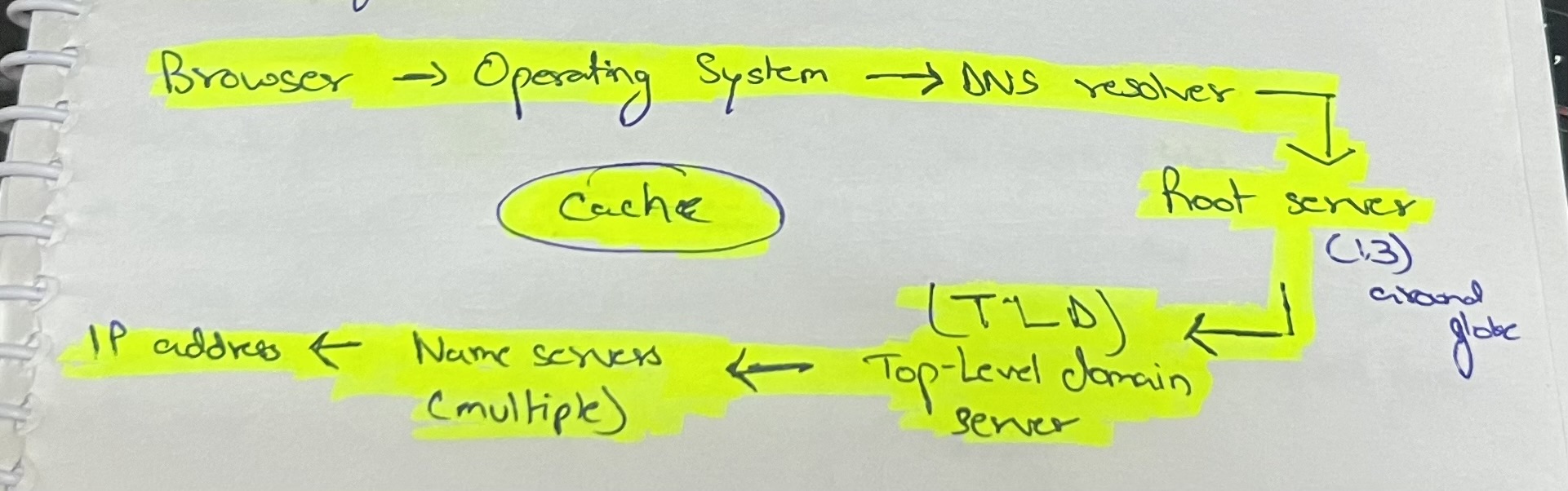
Override DNS records?
hosts file is the solution 😛
/etc/hosts
Security issues with DNS
- Malicious program can interfere with your hosts file
- Man in the middle attack can change the request/response to/from the DNS resolver
- Registrar hijack, our registrar can be hijacked and DNS records can be manipulated
- Resolver spoofing, the ISP DNS resolver could be hacked and malicious response could be sent from there
HTTP vs HTTPS
| HTTP | HTTPS |
| Port: 80 | Port : 443 |
| Plain data; Less secure | Encrypted data; More secure |
| Faster; as no encryption happens | Slower; as data encryption happens |
| Does not need an SSL certificate | Needs an SSL certificate |
SSL certificate is required to verify server’s identity & authenticity of data as well. Consists of [Certificate Authority, Public Key, Validity Info]
SSL uses both Symmetric & Asymmetric Encryption.
Today’s QnA learning aspects
- How will we protect a user (without technical knowledge) from a DNS attack, if it’s loading a fake website?
Ans. We can implement a unique identifier text which would print after the user has entered username, which would help user verify its account. - About session cookies and cookie expiration time.
[Information]: How to create a session cookie? ->
Creating a cookie without specifying an expiration time would create it as a Session Cookie, which would delete on browser close. - Advantages of MailHog:
– Can be used to debug emails
– Can be used to prevent sending emails to production environment database emails
– Can be used to work with emails without even an internet connection
That’s pretty much how my day today went at rtCamp, looking towards more wonderful days.
Regards
–
Aryan Jasala
WordPress Engineer Trainee