

PHP Unit Testing with WordPress
To create the unit test files in wordpress, we can use the scaffold command from the wp cli.
First we have to navigate to our plugin folder for which we want to write the test cases
wp scaffold plugin-tests <plugin-name>This command would generate two directors bin and src
- bin -> Contains the install file
- src -> Contains the bootstrap file with 1 sample test case
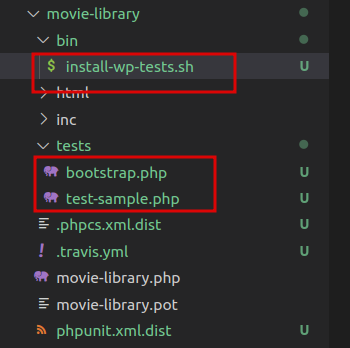
Now we have to run the install file in the bin/install-wp-tests.sh
./install-wp-tests.sh <db-name> <db-user> <db-pass> [db-host] [wp-version]Here the db-host and wp-version parameters are optional
we have to add the following information to it
<db-name> – Name of the test database you created.
<db-user> – User of the database.
<db-pass> – Password of the Database user.
We have to make the following changes in the /install-wp-test.sh
in the recreate_db function we have to replace the data with
mysqladmin drop $DB_NAME -f –user=”$DB_USER” –password=”$DB_PASS”$EXTRAWe have to add the same -user and -password parameter in the create_db function
mysqladmin create $DB_NAME –user=”$DB_USER” –password=”$DB_PASS”$EXTRAinstall_db()
mysql –user=”$DB_USER” –password=”$DB_PASS”$EXTRA –execute=’show databases;’ | grep ^$DB_NAMESNow we can execute the install tests file
Now to start the test, inside our plugin folder we have to use the command phpunit and this would run the tests.
phpunit.xml.dist
This is the file in the directory after the scaffold command, it contains the configuration of the unit tests inside that plugin directory, from here we can change the behaviour of the unit tests for that partiuclar plugin
<?xml version="1.0"?>
<phpunit
	bootstrap="tests/bootstrap.php"
	backupGlobals="false"
	colors="true"
	convertErrorsToExceptions="true"
	convertNoticesToExceptions="true"
	convertWarningsToExceptions="true"
	>
	<testsuites>
		<testsuite>
			<directory prefix="test-" suffix=".php">./tests/</directory>
			<exclude>./tests/test-sample.php</exclude>
		</testsuite>
	</testsuites>
</phpunit>