What it does
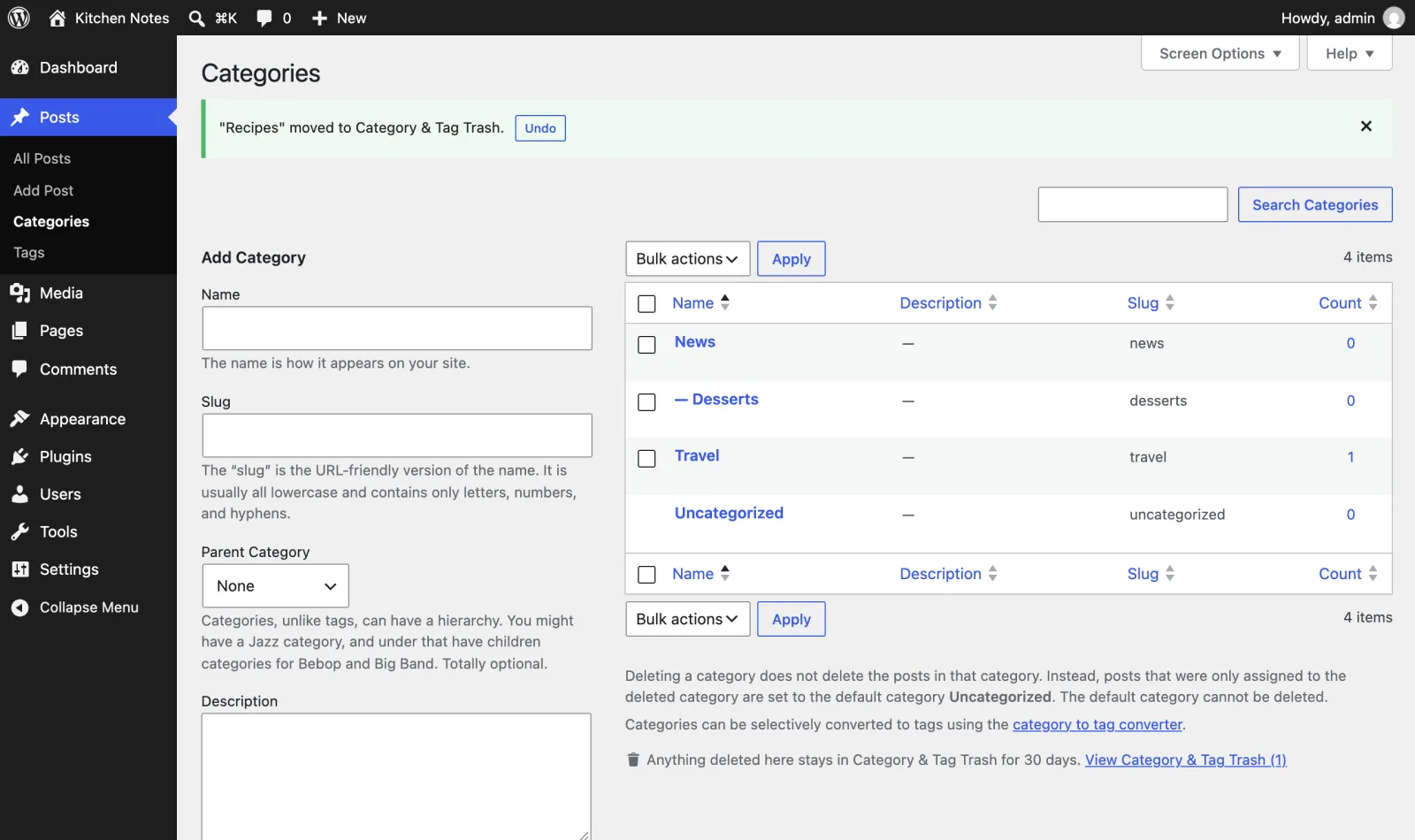
Posts and pages go to the trash when you delete them. Categories and tags don’t: one click on "Delete" and the term is gone. WordPress also moves its posts to "Uncategorized", moves its child categories up a level and removes it from your menus. Getting it back means restoring a database backup.
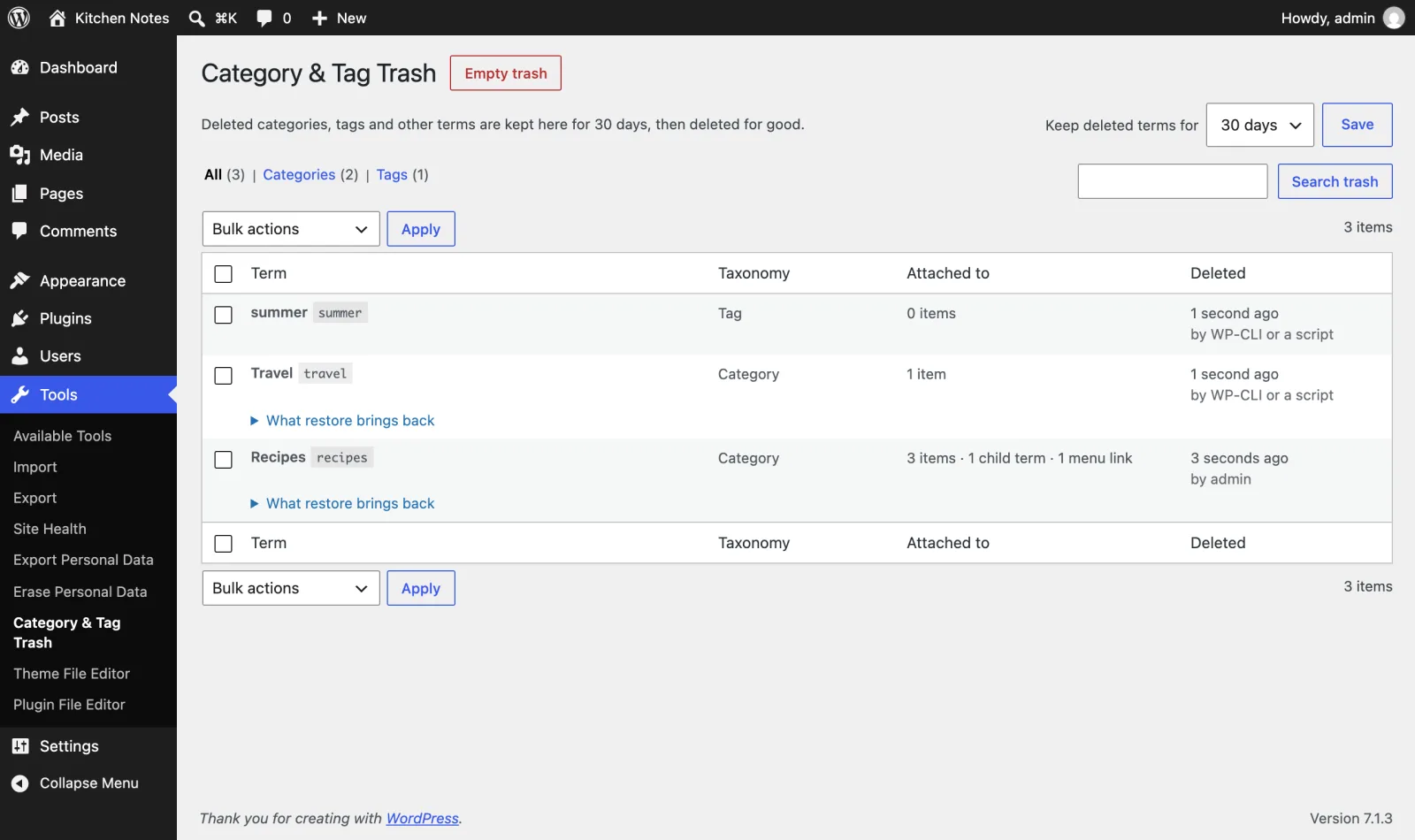
Category & Tag Trash keeps every deleted term for 30 days (or 7, 90 or 365, your choice).
Undo appears the moment you delete a term, on the Categories, Tags or any other term screen, for single and bulk deletes. Restore later from Tools > Category & Tag Trash puts back:
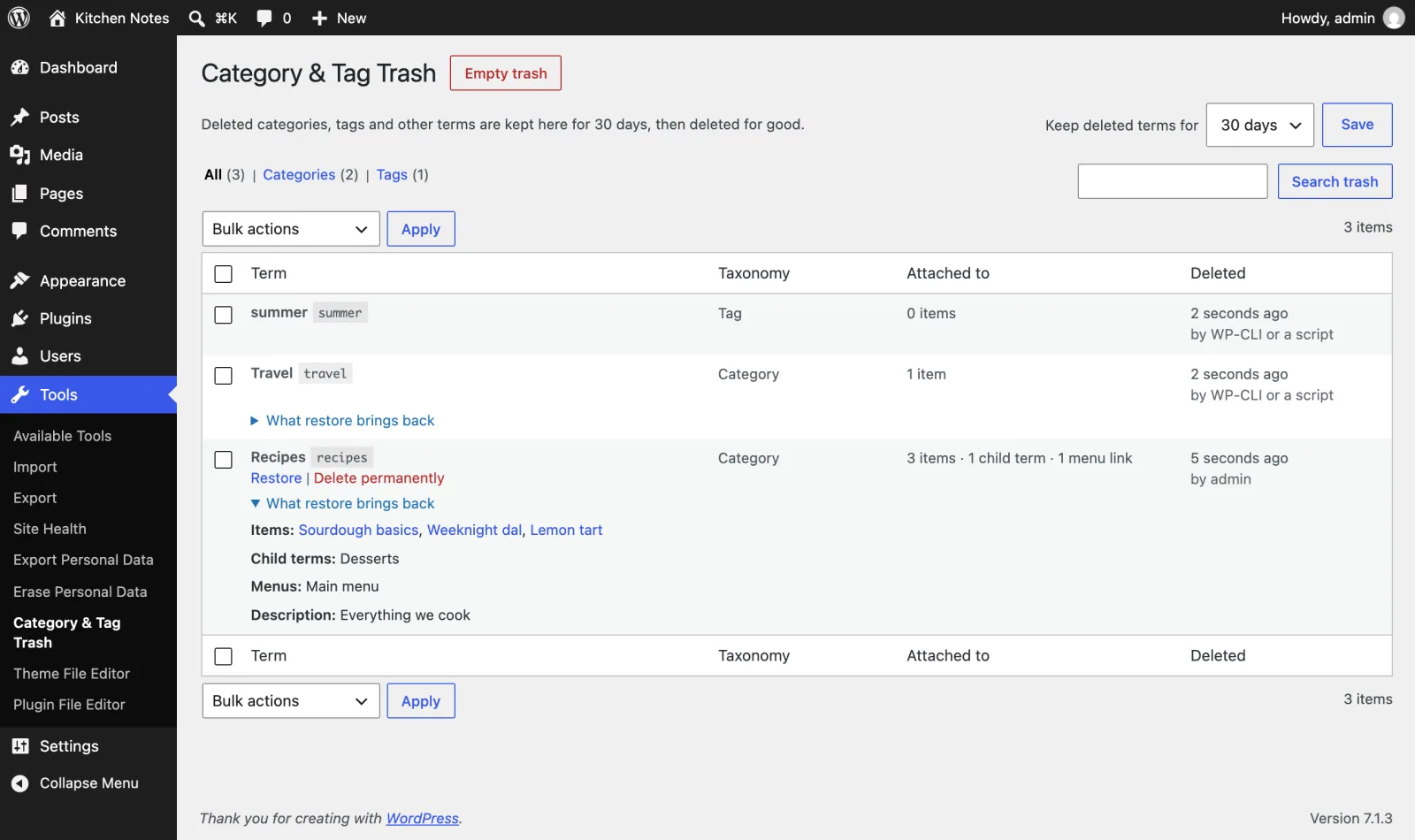
- the term itself, with the same ID, name, slug, description and parent,
- all of its term meta (colours, images, SEO fields stored by other plugins),
- every post it was assigned to, in the same order,
- its child terms, moved back underneath it,
- the menu links that pointed to it, in the same menu and position, with their sub-items,
- and it removes "Uncategorized" from posts that only got it because of the deletion.
Keeping the same ID matters: navigation blocks, widgets and shortcodes that point to the term by ID work again without editing them.
Works with categories, tags, WooCommerce product categories and attributes, and any custom taxonomy that has an admin screen.
Free and open source under the GPL. No pro version, no upsells, no ads in wp-admin, no tracking. And it stays that way.
Where to find it
- Tools > Category & Tag Trash lists deleted terms with what they were attached to, who deleted them and when. Filter by taxonomy, search, restore or delete in bulk, see exactly which posts, child terms and menus a restore brings back, and empty the trash.
- Every category and tag screen has a link to it under the list.
WP-CLI
wp category-tag-trash listwp category-tag-trash restore <id>...wp category-tag-trash delete <id>...orwp category-tag-trash delete --all
Install
Upload
- Download category-tag-trash.zip (v2.0.0).
- In wp-admin, go to Plugins > Add New Plugin > Upload Plugin and choose the zip.
- Click Install Now, then Activate.
WP-CLI
Install and activate the latest release in one command:
wp plugin install https://github.com/aryanjasala/category-tag-trash/releases/download/v2.0.0/category-tag-trash.zip --activateCompatibility
| WordPress | PHP | Status |
|---|---|---|
| WordPress 7.1 | PHP 8.3 | Tested |
| WordPress 6.9 | PHP 8.3 | Tested |
| WordPress 6.6 | PHP 7.4 | Tested |
Questions
What happens if a new term uses the old slug?
The restored term gets a unique slug instead, and Category & Tag Trash tells you which one.
What if a post was deleted while the term was in the trash?
It is skipped. Everything else is restored.
What if I changed a post’s categories in the meantime?
Only posts that still have exactly the default category plus the restored term lose the default category. Posts you changed by hand are left alone, and so are child terms you moved somewhere else.
How long are terms kept?
30 days by default, then a daily task deletes them for good. Choose 7, 30, 90 or 365 days on the Category & Tag Trash screen, or use the category_tag_trash_retention_days filter.
Can I leave a taxonomy out?
Use the category_tag_trash_supports_taxonomy filter. Menus are never kept, because deleting a menu removes its items first.
Does it work for a tag on thousands of posts?
Yes. The posts are saved in small chunks, so the trash stays light. A restore brings back the first 5,000 posts right away and the rest in the background, and wp category-tag-trash restore <id> does it all in one go. Search plugins like ElasticPress are told about every post that gets its term back.
For developers
Every default, limit and message has a filter, and every change fires an action. The full reference, with constants, abilities and WP-CLI, is in REFERENCE.md.
category_tag_trash_supports_taxonomyFilter- Return
falseto delete a taxonomy’s terms for good, as WordPress normally does. Menus (nav_menu) are never kept( bool $keep, string $taxonomy ) category_tag_trash_keep_termFilter- Whether one deleted term goes to the trash, for example to let empty tags go for good( bool $keep, WP_Term $term )
category_tag_trash_retention_daysFilter- Days a trashed term is kept. Wins over the setting on the screen( int $days )
category_tag_trash_retention_choicesFilter- Periods offered on the screen. Default 7, 30, 90 and 365( int[] $days )
category_tag_trash_undo_secondsFilter- How long the Undo notice after a bulk delete stays. Default 300( int $seconds )
category_tag_trash_trashedAction- A deleted term landed in the trash( int $item_id, Snapshot $snapshot )
category_tag_trash_deletedAction- A trashed term is about to be deleted for good: Empty trash, Delete permanently or the daily clean-up. Not on restore( int $item_id, Snapshot $snapshot )
category_tag_trash_purgedAction- The daily clean-up deleted this many expired terms( int $deleted )
category_tag_trash_restoredAction- Fires once the term is back.
$object_idsholds the objects re-attached in that request, at most 5,000( int $term_id, string $taxonomy, Snapshot $snapshot, int[] $object_ids ) category_tag_trash_objects_restoredAction- Fires for every batch of objects re-attached, in the request and in the background( int $term_id, string $taxonomy, int[] $object_ids )
category_tag_trash_restore_completeAction- Fires once every object is back( int $term_id, string $taxonomy, Snapshot $snapshot )
category_tag_trash_restore_batch_sizeFilter- Objects re-attached per request or cron run. Default 5000( int $size )
category_tag_trash_capabilityFilter- Capability for Tools > Category & Tag Trash. Default
manage_categories. Each restore and delete still checks the term’s own taxonomy( string $capability )
Changelog
- v2.0.0
- ChangedRename to Category & Tag Trash for WordPress.org (breaking change)
- v1.3.0
- FixMake the abilities visible to MCP agents
- NewAdd abilities so AI agents can find, restore and delete trashed terms
- v1.2.0
- NewAdd filters for which terms are kept, retention choices and the Undo window, and actions for trash events
- FixKeep big terms safe to delete and restore on large sites
- FixUpdate the Category & Tag Trash count right after a delete
Every release, with notes: GitHub releases.