What it does
Every agency has a staging story. A copy of the live database goes to staging, and then:
- a scheduled task emails every customer from the staging site,
- Google indexes staging.example.com and it outranks the real site,
- someone spends an hour editing staging, thinking it was live.
Staging Guard prevents all three, on every copy that is not the live site.
On staging, development and local copies it:
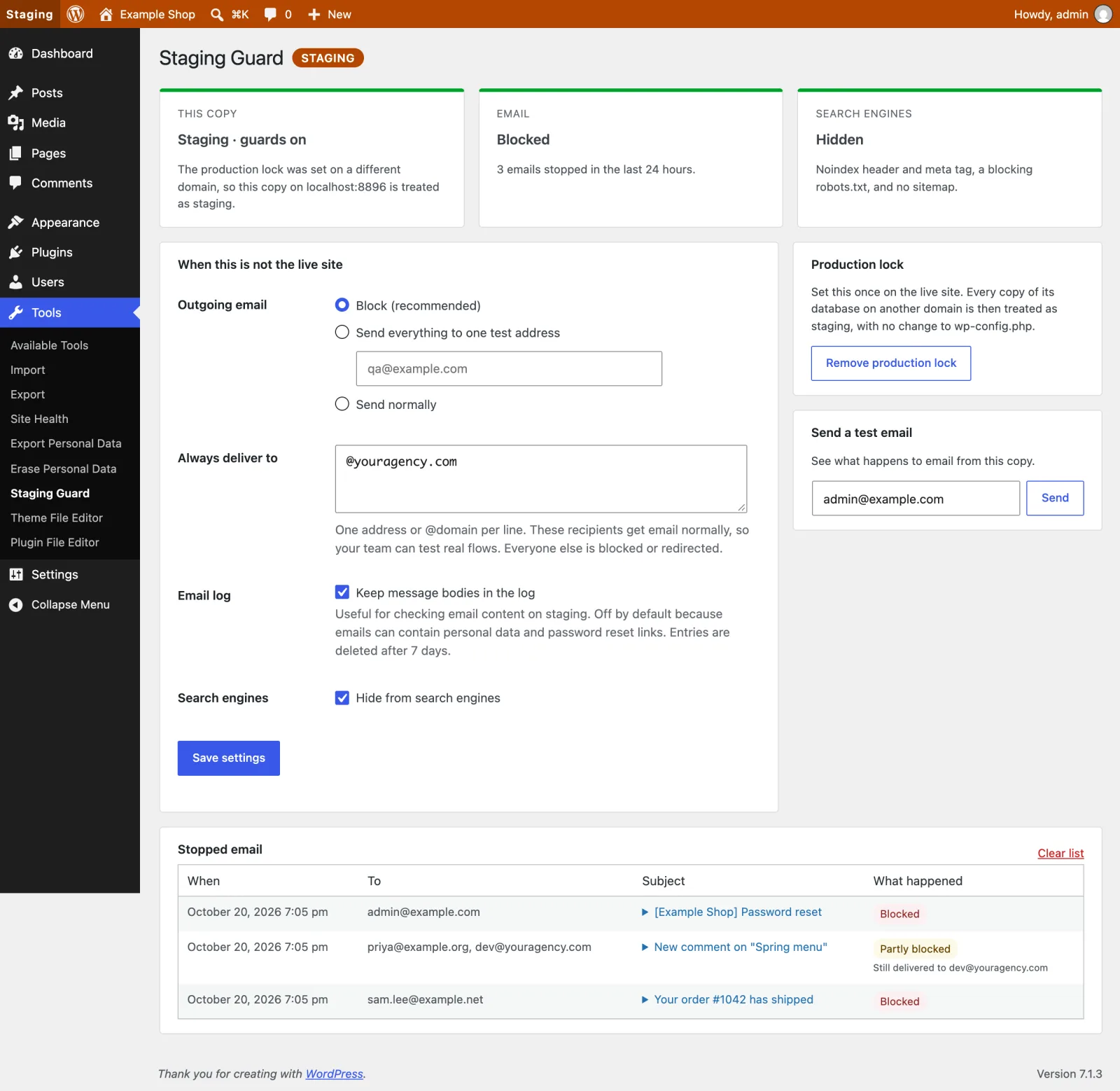
- Blocks all outgoing email, or sends it all to one test address with the real recipients shown in the subject. Cc and Bcc recipients are removed too.
- Lets your own team keep receiving email: list addresses or whole domains (@youragency.com) under "Always deliver to".
- Keeps a list of the last 50 stopped emails (recipient, subject and time), so you can see what would have gone out. Turn on "keep message bodies" to check email content as well.
- Sends a test email from the settings screen, so you can see exactly what happens to email from this copy.
- Hides the site from search engines with an
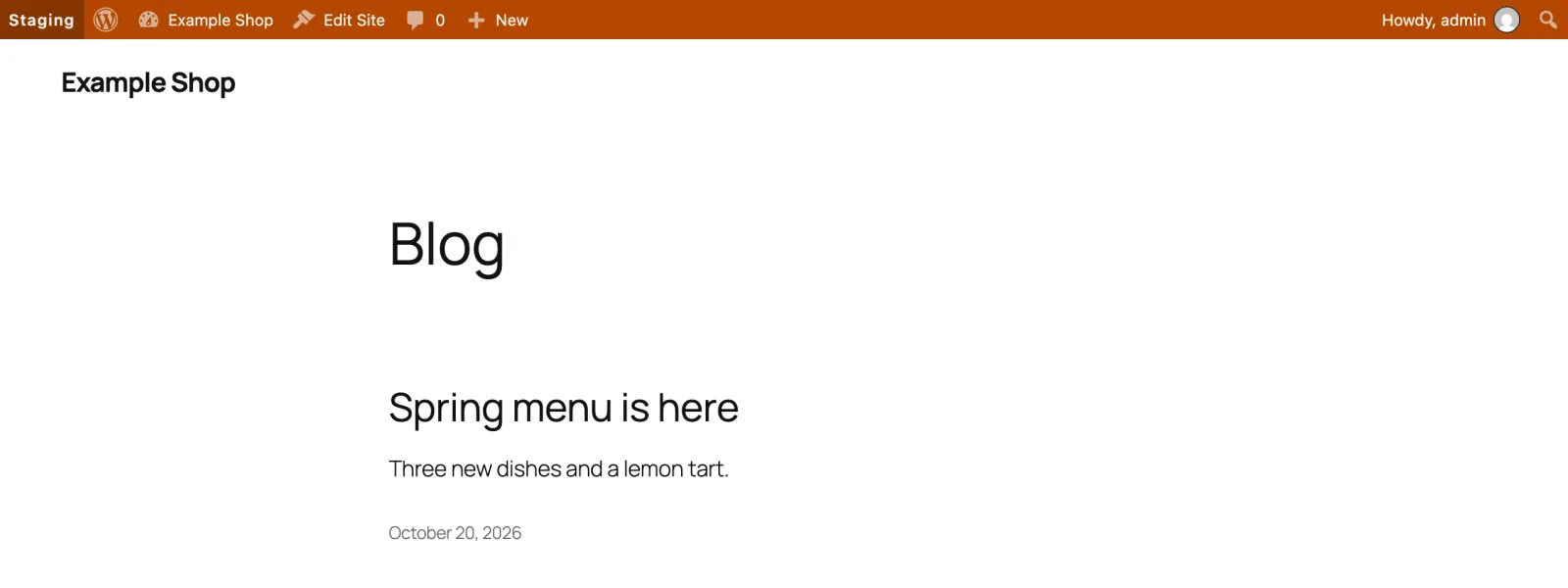
X-Robots-Tagheader, anoindex, nofollowrobots meta tag and a robots.txt that blocks everything, and turns off the XML sitemap. - Colours the whole admin bar (orange for staging, blue for development, green for local) and labels it, on the dashboard and on the front end.
- Adds the environment to every browser tab title, for example "[Staging] Posts", so the right tab is easy to find.
- Adds a Site Health check that warns when email from a staging copy could still reach real people, or when staging copies of the live site would not be detected.
On the live site it does nothing.
Free and open source under the GPL. No pro version, no upsells, no ads in wp-admin, no tracking. And it stays that way.
How it knows which copy is live
- If
WP_ENVIRONMENT_TYPEis set in wp-config.php or in the server environment, it uses that. This is the WordPress standard, and many hosts set it for you. - Otherwise, use the production lock: on the live site, go to Tools > Staging Guard and click "This is the live site". From then on, any copy of the database running on a different domain is treated as staging, with no wp-config.php change.
The lock stores a hash of the live domain instead of the domain itself. Migration tools that search and replace the domain name in the database leave the hash alone, so the lock survives the copy to staging.
If neither is set, WordPress assumes production and Staging Guard stays off.
Settings in wp-config.php
Fix the email behaviour per environment, so a database copy cannot change it:
define( 'STAGING_GUARD_MAIL_MODE', 'redirect' ); // block, redirect or allow
define( 'STAGING_GUARD_REDIRECT_TO', '[email protected]' );
define( 'STAGING_GUARD_ALLOWLIST', '@youragency.com, [email protected]' );
define( 'STAGING_GUARD_PRODUCTION_HOSTS', 'example.com, shop.example.com' ); // the live domains
define( 'STAGING_GUARD_KEEP_BODIES', false );
define( 'STAGING_GUARD_NOINDEX', true );
define( 'STAGING_GUARD_LOG_DAYS', 7 );
WP-CLI
wp staging-guard statusshows the environment, how it was detected, and what is guarded.wp staging-guard lock-productionmarks the current domain as the live site.wp staging-guard unlock-productionremoves the lock.wp staging-guard loglists stopped email.wp staging-guard test-email [email protected]sends a test email and reports what happened to it.
Install
Upload
- Download staging-guard.zip (v1.3.0).
- In wp-admin, go to Plugins > Add New Plugin > Upload Plugin and choose the zip.
- Click Install Now, then Activate.
WP-CLI
Install and activate the latest release in one command:
wp plugin install https://github.com/aryanjasala/staging-guard/releases/download/v1.3.0/staging-guard.zip --activateCompatibility
| WordPress | PHP | Status |
|---|---|---|
| WordPress 7.1 | PHP 8.3 | Tested |
| WordPress 6.9 | PHP 8.3 | Tested |
| WordPress 6.6 | PHP 7.4 | Tested |
Questions
Does it work with SMTP plugins?
Yes, for plugins that send through WordPress’s own wp_mail() function, which is most of them. A few plugins replace wp_mail() entirely. Staging Guard detects this and shows a warning on its settings screen, because it cannot intercept those emails.
Will blocked emails break password resets on staging?
No. Blocked emails are reported to WordPress as sent, so forms and password resets behave normally. Use redirect mode if you need to receive them.
What if I copy the staging database to production?
The production lock is still stored, and the live domain still matches it, so the live site stays unguarded. The search engine setting under Settings > Reading is never changed by this plugin.
Can I change how the environment is detected?
Use the staging_guard_environment filter. It receives an array with type (production, staging, development or local) and source.
What if the live site moves to a new domain?
Then the production lock no longer matches, and the live site would count as staging. Staging Guard warns about this on every admin screen and in Site Health, so it does not go unnoticed. Lock the new domain from Tools > Staging Guard, or list every live domain in STAGING_GUARD_PRODUCTION_HOSTS so a move never trips it. www. and the bare domain already count as the same.
Does the email log keep personal data?
It keeps who an email was for and its subject, and the message only if you turn that on. Entries are deleted after 7 days, and the log is part of the WordPress export and erase personal data tools. The live site keeps no log.
For developers
Every default, limit and message has a filter, and every change fires an action. The full reference, with constants, abilities and WP-CLI, is in REFERENCE.md.
staging_guard_environmentFilter- Change the detected environment, see below( array $environment )
staging_guard_production_hostsFilter- The live site’s domains. Default from
STAGING_GUARD_PRODUCTION_HOSTS( string[] $hosts ) staging_guard_mail_policyFilter- The final email handling:
mode,redirect_to,allowlist. For example redirect on staging but block on development. A redirect without a valid address still blocks( array $policy, string $environment ) staging_guard_allow_emailFilter- Let one email out untouched and unlogged, such as monitoring alerts to your own team( bool $allow, array $atts )
staging_guard_allowlistFilter- Addresses and
@domainsthat still get email( string[] $allowlist ) staging_guard_redirect_subjectFilter- Subject of a redirected email. Default
[STAGING → original recipients] Subject( string $subject, string[] $stopped, array $atts ) staging_guard_noindexFilter- Whether staging copies are hidden from search engines( bool $noindex )
staging_guard_robots_txtFilter- The robots.txt a staging copy serves( string $output )
staging_guard_coloursFilter- Admin bar colour per environment type. Anything but a hex colour falls back to the default( array $colours )
staging_guard_environment_labelFilter- The environment name in the admin bar and on the screens, such as "UAT"( string $label, string $type )
staging_guard_log_sizeFilter- Stopped emails the log keeps at most. Default 1000( int $size )
staging_guard_log_daysFilter- Days a stopped email stays in the log( int $days )
staging_guard_capabilityFilter- Who may see and change Staging Guard. Default
manage_options, ormanage_network_optionson multisite( string $capability ) staging_guard_mail_stoppedAction- Fires when an email is blocked or redirected.
$entryhasid,to,subject,action,deliveredandbody( array $entry, array $atts ) staging_guard_production_lockedAction- The production lock was set on this domain( string $domain )
staging_guard_production_unlockedAction- The production lock was removed
Changelog
- v1.3.0
- FixMake the abilities visible to MCP agents
- NewAdd abilities so AI agents can tell staging from the live site before doing anything risky
- v1.2.0
- NewAdd filters for email handling, robots.txt, colours and labels, and actions for the production lock
- FixWarn when the live site counts as staging, and move the email log out of one option
- v1.1.0
- New"Always deliver to" allowlist for addresses and @domains
- NewSend a test email from the settings screen or WP-CLI
- NewOptionally keep message bodies in the email log
- NewSite Health check
- NewEnvironment shown in browser tab titles
- NewRedesigned settings screen with status cards
- Rewritten as PSR-4 classes
Every release, with notes: GitHub releases.