What it does
WordPress revisions are all or nothing. If someone deleted a paragraph last week and the post has been edited ten times since, "Restore This Revision" brings the paragraph back but throws away the ten edits. The usual workaround is copying text out of the revisions screen by hand, which loses the block’s formatting and settings.
Restore Blocks from Revisions works inside the block editor and restores single blocks, with all their settings.
Restore one block to an earlier version
- Select the block and open its menu (⋮).
- Choose Restore from a revision…
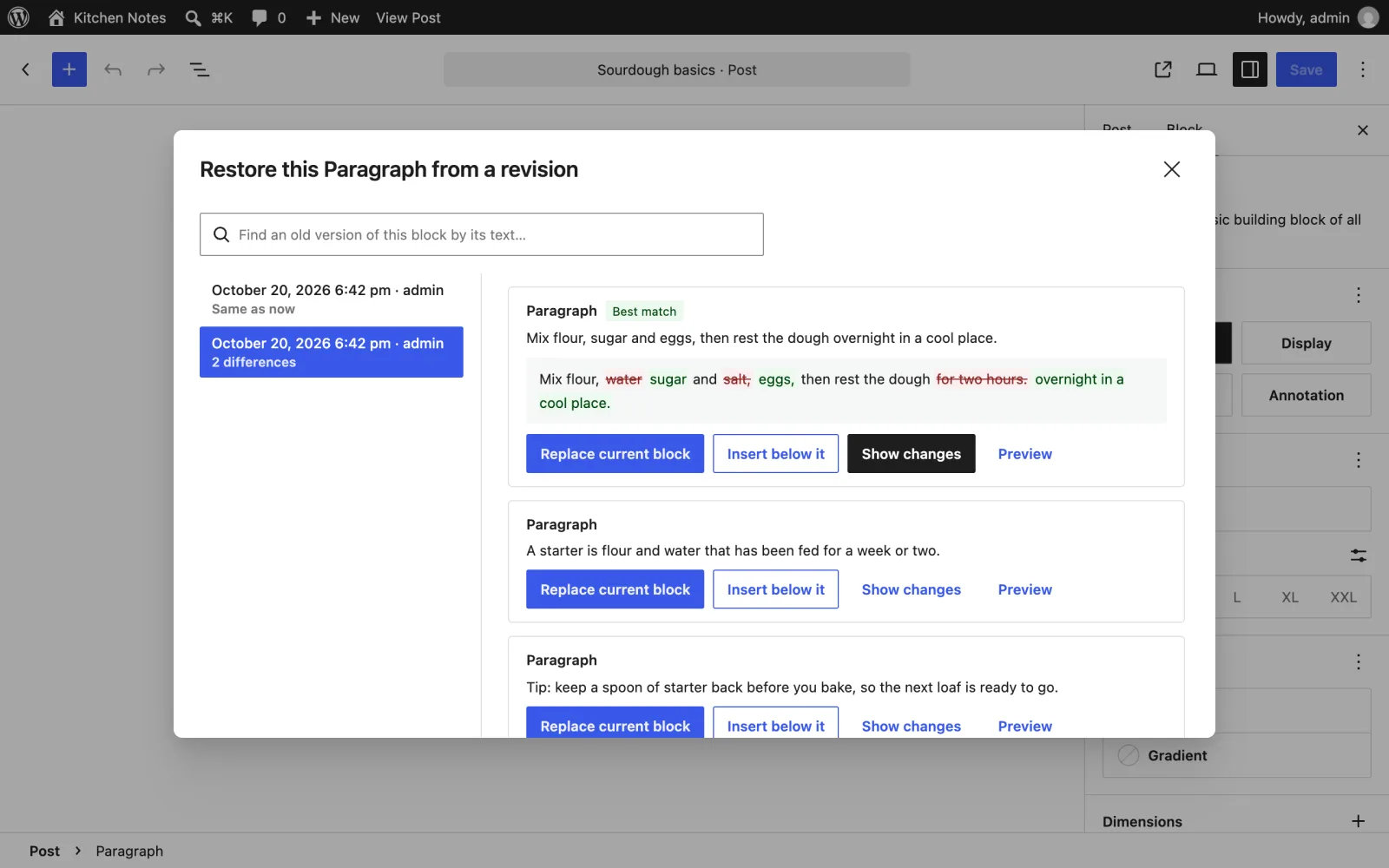
- Pick a revision. You see the versions of that block in it, best match first.
- Click Replace current block, or Insert below it to compare them side by side.
Bring back a deleted block
- Open the editor’s main menu (⋮ at the top right).
- Choose Restore blocks from a revision.
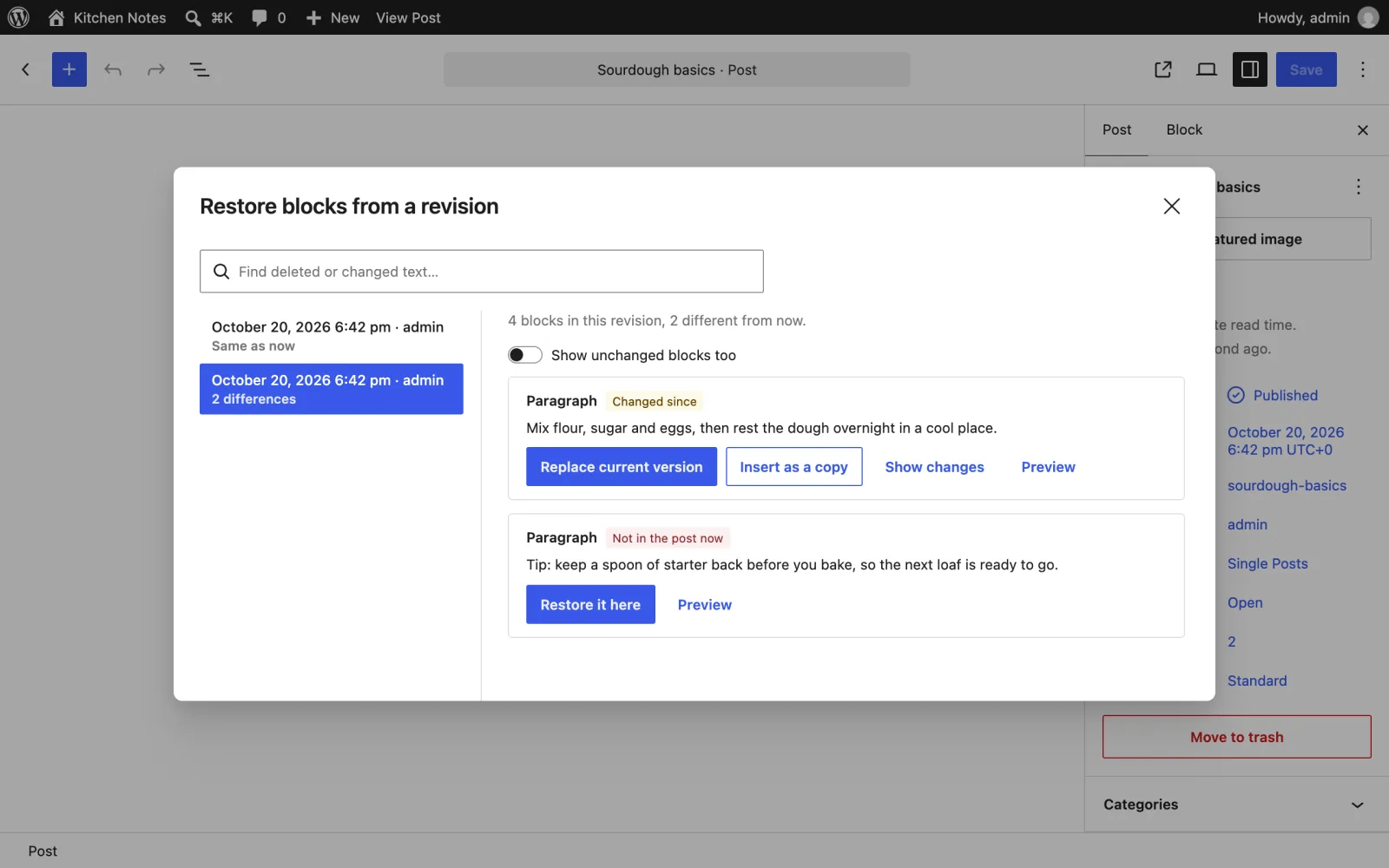
- Pick a revision. Its blocks are labelled Not in the post now, Changed since or Same as now.
- Click Restore it here to put a deleted block back where it was.
Find text you deleted
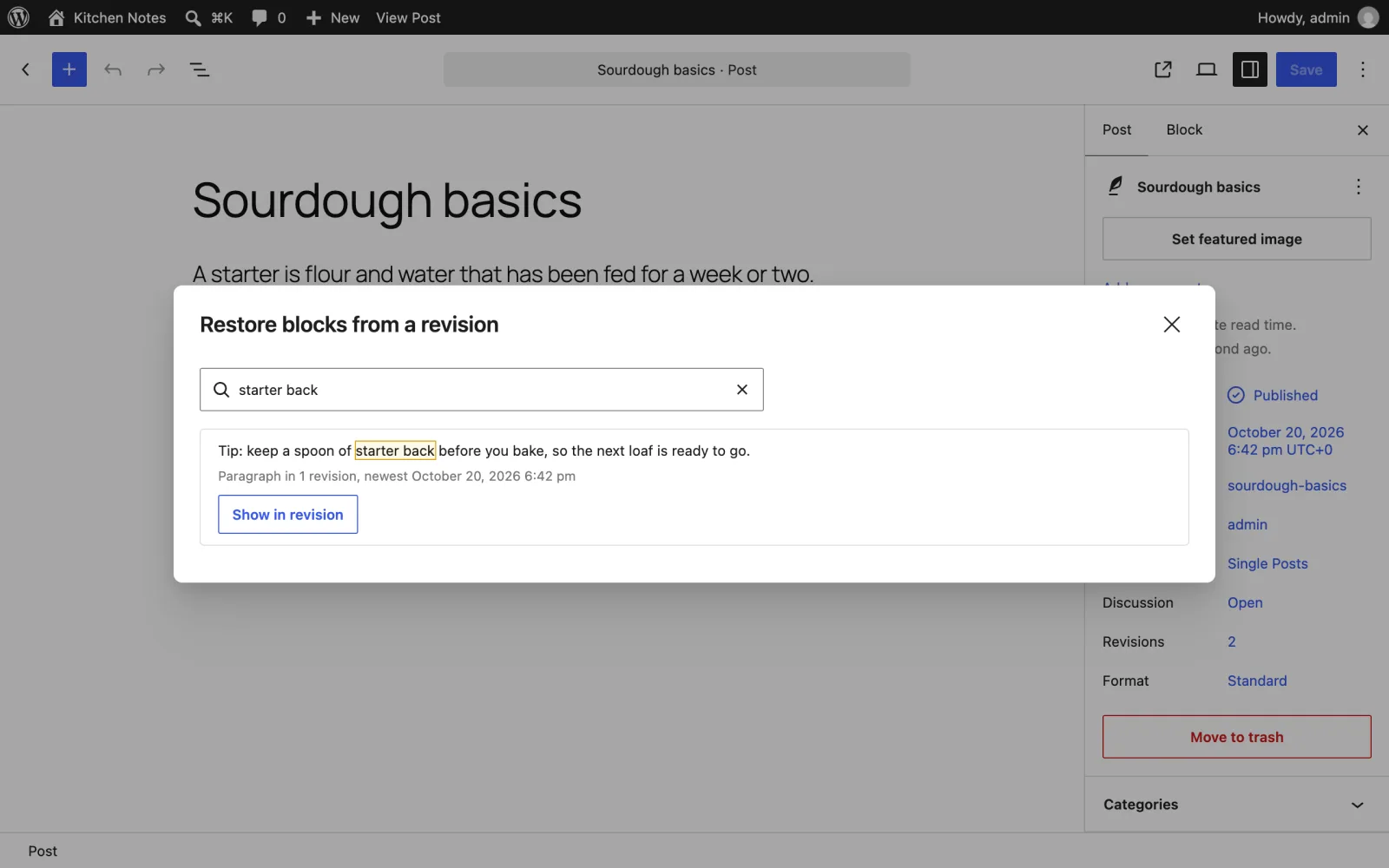
Can’t remember which revision had the sentence you need? Type a few words into "Find text in old revisions". Every block that contained them is listed, with how many revisions it appears in. Click one to jump to it.
Every restore is a normal edit: press Ctrl+Z (⌘Z on a Mac) to undo it, and nothing is saved until you update the post.
- "Show changes" highlights the words that differ between the block now and its old version.
- Previews show each block as it looked in that revision.
- Each revision shows who saved it and how many blocks differ from now. Autosaves are labelled, and the window opens on the newest revision that actually differs.
- Works with any block, including blocks from other plugins, and with every post type that has revisions.
- Revisions are loaded without rendering them on the server, so posts with many revisions open quickly.
No settings and nothing stored in the database.
Free and open source under the GPL. No pro version, no upsells, no ads in wp-admin, no tracking. And it stays that way.
Install
Upload
- Download restore-blocks-from-revisions.zip (v2.0.1).
- In wp-admin, go to Plugins > Add New Plugin > Upload Plugin and choose the zip.
- Click Install Now, then Activate.
WP-CLI
Install and activate the latest release in one command:
wp plugin install https://github.com/aryanjasala/restore-blocks-from-revisions/releases/download/v2.0.1/restore-blocks-from-revisions.zip --activateCompatibility
| WordPress | PHP | Status |
|---|---|---|
| WordPress 7.1 | PHP 8.3 | Tested |
| WordPress 6.9 | PHP 8.3 | Tested |
| WordPress 6.6 | PHP 7.4 | Tested |
Questions
How does it find "the same block" in an old revision?
Blocks have no permanent ID between saves, so it compares blocks of the same type, preferring the one at the same position and with the most words in common. You can always pick a different version from the list.
Where is the option? I can’t see it.
It appears in the block editor for post types that keep revisions, such as posts and pages. If revisions are turned off for the site (WP_POST_REVISIONS set to false), there is nothing to restore from.
Does it work in the Site Editor?
Not yet. Templates have revisions too, and support is planned.
For developers
Every default, limit and message has a filter, and every change fires an action. The full reference, with constants, abilities and WP-CLI, is in REFERENCE.md.
restore_blocks_from_revisions_post_typesFilter- Post types that get Restore Blocks from Revisions. Default every REST-enabled post type with revisions and the editor. Types without revisions are dropped( string[] $post_types )
restoreBlocksFromRevisions.canRestoreFilter- Whether a block’s menu offers "Restore from a revision…"( boolean canRestore, Object block )
restoreBlocksFromRevisions.revisionsPerPageFilter- Revisions loaded at a time, 1 to 100. Default 50( number perPage )
restoreBlocksFromRevisions.restoredAction- A block came back.
modeisreplace,insert-after,replace-atorinsert-at( { mode, block, revisionId, postId } )
Changelog
- v2.0.1
- FixLoad revision content on WordPress 6.6 to 6.9
- v2.0.0
- ChangedRename to Restore Blocks from Revisions for WordPress.org (breaking change)
- v1.3.0
- FixMake the abilities visible to MCP agents
- NewAdd abilities so AI agents can find deleted blocks and restore one block from a revision
Every release, with notes: GitHub releases.